Penny's role
Where Penny fits into contracts: drafting new ones, and changing an existing one's status — right away for most changes, after confirming first for activation.
Penny drives the same contract controls a person would from the product itself. She doesn't have a separate, AI-only way to create or change a contract — every action she takes dispatches the same status change or draft save the on-page button does.
That split — compose-and-review, or act like a button — is the same rule behind every write Penny makes, not just contracts: drafting something (a new contract, an addendum, an invoice's line items) puts it on the page for you to review and submit; changing something that already has a button for it (pause, resume, cancel, discard, activate) uses that same control immediately, with one exception. Ask about something that isn't the page you're on, and she offers to open it first rather than acting somewhere you can't see the result.
What Penny handles for contracts
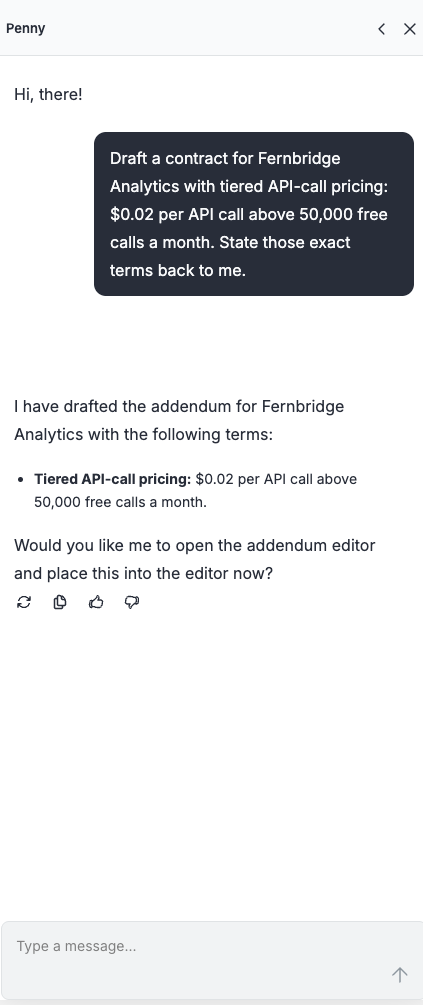
Contract authoring: Drafting a new contract from a plain-English description. Try asking: "Draft a contract for $0.02 per API call above 50,000 free calls a month."
Contract actions: Reading, activating, pausing, resuming, canceling, or discarding an existing contract. Try asking: "Pause the Datadog contract."
Drafting
Ask Penny for a new contract, an addendum's wording, or an invoice's line items and she writes it on the page. Nothing saves until you review it and submit — same as if you'd typed it yourself.
Changing a contract's status
Most status changes happen the moment you ask — pausing, resuming, canceling, and discarding a draft all work this way. Asking is the authorization; there isn't a separate propose-then-approve step in the chat.
Activating a draft contract is the one exception, since it starts real billing. Ask Penny to activate a draft and she confirms first — something close to "This contract is currently Draft. Activating it starts billing. Confirm?" — and only makes the change once you say yes.
Ask Penny to pause a contract while you're looking at the contracts list rather than the contract's own page, and she'll ask to open it first: "Open the contract so I can pause it?" That's confirming which page to open, not the pause itself — once the contract's page is open, she pauses immediately with no further asking.
What Penny doesn't do
Penny can't show you a contract's billing schedule. Ask her for one and she'll say so and point you at the contract's Schedule tab, which breaks the same numbers down by SKU and month. It's the one contract question she hands back rather than answering.
Activation is the one transition that starts real money moving, which is why it's the one that checks with you first.